Classic Bowling 3D
Reviews
💡Classic Bowling 3D successfully brings the familiar sport to the browser with a clean 3D presentation. The controls are intuitive, allowing you to adjust position, angle, and speed with ease. The game offers a good balance of challenge and relaxation, with different lane conditions keeping each session interesting. It is perfect for quick breaks or longer play sessions. The lack of download requirements makes it instantly accessible.
Description
Game Introduction
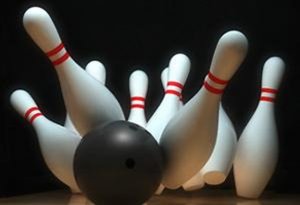
Classic Bowling 3D brings the timeless sport of bowling to your browser. The core objective is simple: knock down as many pins as possible by rolling a ball down a lane. You control the position of your throw, the angle of release, and the speed of the ball. The game is designed for quick sessions, making it easy to play a few frames during a break or enjoy a longer match. Its 3D presentation adds a modern feel while keeping the familiar rules of bowling. The experience is built to be accessible for newcomers while offering enough depth to keep regular players engaged. As you play, you will face different lane conditions and pin setups that require adjustments to your technique. The game rewards precision and consistency, encouraging you to improve your score with each attempt. It is a browser-based game, meaning there is no software to install or update. You can start playing immediately on any device with an internet connection.
How to Play
Players use either a keyboard or mouse to control the ball. Before starting, it is helpful to review the on-screen controls to understand how to aim and release the ball. The main goal in each round is to knock down all ten pins in as few throws as possible. You can adjust your starting position along the lane, set the angle of your throw, and choose the ball speed. Timing your release is important for accuracy. Early rounds are a good time to practice basic movements and get a feel for the controls. As you progress, you will need to combine positioning, timing, and speed to handle more challenging lane conditions. The game can be paused at any time, allowing you to take breaks as needed.
Game Features
Classic Bowling 3D includes clear progression with objectives that become more demanding over time. The game is optimized for both desktop and mobile browsers, ensuring a smooth experience on different devices. Different lane environments and pin configurations keep each play session feeling fresh. The game may include customization options that let you adjust aspects of the experience to your preference. A reward system encourages you to complete goals and beat your personal records. The game offers a variety of modes and scenarios typical of the bowling genre. Its intuitive controls are well-suited for fast, browser-based play sessions. The combination of changing conditions and personal score tracking provides strong replay value.
Tips for Success
Observe the lane conditions before each throw; patience often leads to better results. Learn from each attempt and adjust your strategy on the next throw. Focus on knocking down the remaining pins before chasing high scores. Stay calm when the difficulty increases, as rushed throws often lead to mistakes. Use the early rounds to master the controls and find a comfortable rhythm. In bowling games, combining consistent form with smart adjustments is the key to improvement.
Compatibility
Faq
Is Classic Bowling 3D free to play?
Can I play Classic Bowling 3D on my phone or tablet?
Do I need to create an account to save my progress?
What happens if I get a strike or spare?
Are there different ball types or lane conditions?
How is the score calculated in Classic Bowling 3D?
Similar Games
Galaxy Bowling Challenge
Galaxy Bowling Challenge is a fun, free bowling game with easy controls and engaging progression.
Armored Arena Tactics
A fun, strategic browser game with engaging missions and competitive arena matches. Great for quick sessions.
Hazard Clear Arena Arcade Game
A fun, free arcade puzzle game with simple controls and engaging power-ups across 4 stages.
Billiard Ball Match Puzzle
A fun, colorful puzzle game that combines bubble shooting with billiards. Great for families and free to play.

Four Rhythm Challenge Music Game
A delightful rhythm game with catchy music and easy controls. Perfect for all ages.

Candy Box Puzzle
A delightful puzzle game with cute monsters and simple controls. Perfect for quick, fun breaks.
Online Multiplayer Blaster Battle
A fun, family-friendly blaster game with team battles, smooth controls, and regular updates for all ages.

Swing Star Arcade Game
Swing Star offers addictive physics-based swinging with simple tap controls and vibrant graphics.

Classic Bowling 3D
A polished 3D bowling game that is easy to pick up and offers satisfying score-chasing fun.
Basket Hoop Challenge Family Sports Game
A fun, family-friendly basketball game with simple controls and bright graphics. Great for quick play sessions.